Convert PDF to JPEG
I know there are allot of online tools that allows you to convert PDF to JPG. For confidential reasons I prefer to do it locally on my machine, keeping sensitive documents private and ensuring compliance with data protection policies.
Why Convert PDF to JPEG Locally?
Converting PDFs to images locally offers several advantages:
- Privacy & Security: Your documents stay on your machine, not uploaded to third-party servers
- Batch Processing: Convert multiple files automatically without repetitive manual steps
- No Size Limits: Process large PDF files without worrying about upload restrictions
- Cost Effective: Free, open-source tools eliminate subscription costs
- Automation: Integrate PDF conversion into scripts and workflows
Using pdftoppm - The Primary Tool
The pdftoppm command line tool is a powerful utility from the Poppler suite for converting PDFs to image formats.
Basic Usage
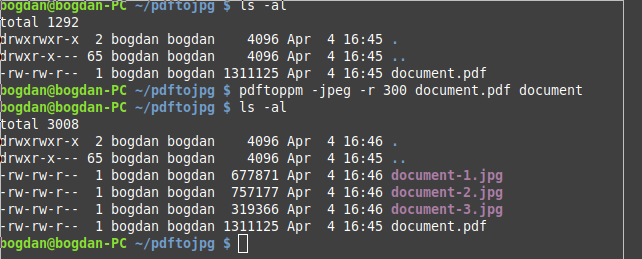
$ pdftoppm -jpeg -r 300 document.pdf document
The flags mean:
-jpeg- Sets the output image format to JPG-r 300- Sets the output image resolution to 300 DPI (dots per inch)document- Prefix for all output files, which will be numbered sequentially
All pages will be converted to separate JPEG files numbered as document-1.jpg, document-2.jpg, etc., in your current directory.
Useful pdftoppm Options
Convert to PNG format with higher quality:
$ pdftoppm -png -r 300 document.pdf document
Convert only specific pages (e.g., pages 1-5):
$ pdftoppm -jpeg -f 1 -l 5 -r 300 document.pdf document
Reduce resolution for smaller file sizes:
$ pdftoppm -jpeg -r 150 document.pdf document
Use different scaling:
$ pdftoppm -jpeg -scale-to 1024 document.pdf document
Convert single page to specific output file:
$ pdftoppm -jpeg -singlefile document.pdf output
Alternative Utilities
ImageMagick (convert command):
$ convert -density 300 document.pdf document.jpg
ImageMagick is versatile and supports many formats, but can be slower for large batches.
Ghostscript:
$ gs -q -dNOPAUSE -dBATCH -sDEVICE=jpeg -r300 -sOutputFile=document-%d.jpg document.pdf
Ghostscript is powerful for advanced PDF processing and supports more complex conversions.
Batch Processing Multiple PDFs
Create a script to convert all PDFs in a directory:
#!/bin/bash
for pdf in *.pdf; do
  pdftoppm -jpeg -r 300 "$pdf" "${pdf%.pdf}"
done
Save this as convert_all.sh, make it executable with chmod +x convert_all.sh, and run it in a directory with PDF files.
Installation
On Ubuntu/Debian:
$ sudo apt-get install poppler-utils
On Fedora/RHEL:
$ sudo dnf install poppler-utils