
GitOps Workflows: Automating Kubernetes Deployments with ArgoCD
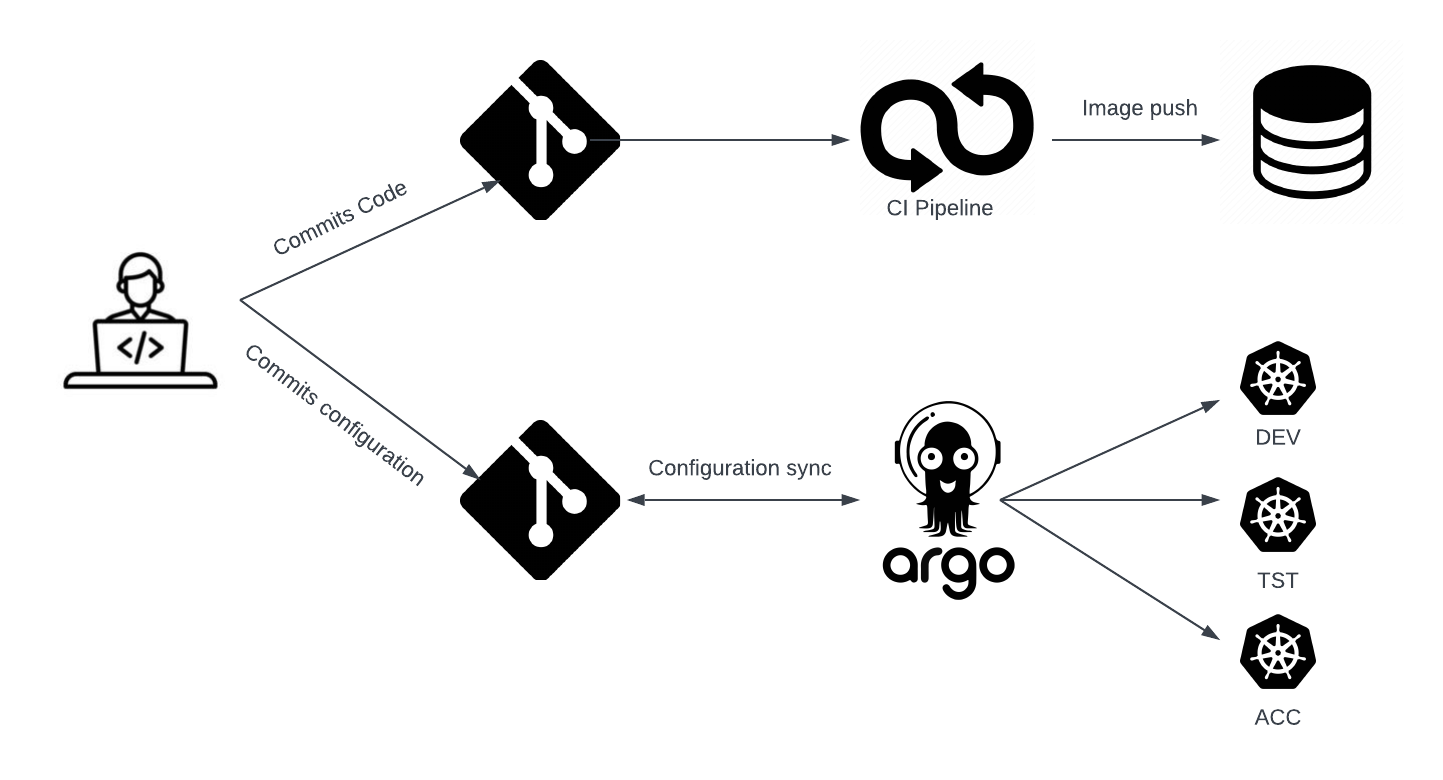
In today’s fast-paced software development landscape, the ability to deploy applications quickly, reliably, and consistently has become a critical competitive advantage. Traditional deployment methods often involve manual processes, imperative commands, and fragmented toolchains that can lead to configuration drift, deployment failures, and security vulnerabilities. This is where GitOps emerges as a transformative approach, treating Git repositories as the single source of truth for both application code and infrastructure configuration.
GitOps represents a paradigm shift in how we think about continuous deployment and infrastructure management. By leveraging Git’s inherent properties—version control, audit trails, rollback capabilities, and collaborative workflows—GitOps enables teams to manage their entire application lifecycle through familiar Git operations. When combined with Kubernetes and ArgoCD, this approach creates a powerful, automated deployment pipeline that ensures consistency across environments while maintaining full traceability and rollback capabilities.
ArgoCD stands out as one of the most mature and feature-rich GitOps operators available today. As a declarative, Kubernetes-native continuous deployment tool, ArgoCD monitors Git repositories for changes and automatically synchronizes the desired state with your Kubernetes clusters. This automation not only reduces manual intervention but also ensures that your production environment always reflects what’s defined in your Git repository, eliminating the “it works on my machine” problem that has plagued development teams for decades.
Prerequisites
Before diving into GitOps workflows with ArgoCD, you should have:
- Kubernetes Knowledge: Solid understanding of Kubernetes concepts including pods, services, deployments, and namespaces
- Git Proficiency: Comfortable with Git workflows, branching strategies, and repository management
- Container Experience: Experience building and managing Docker containers
- YAML Familiarity: Ability to read and write Kubernetes YAML manifests
- Go Development: Basic Go programming knowledge for application examples
- Command Line Tools: kubectl, helm (optional), and git installed and configured
- Kubernetes Cluster: Access to a Kubernetes cluster (local or cloud-based) with cluster-admin privileges
Setting Up ArgoCD for GitOps Workflows
Installing ArgoCD in Your Kubernetes Cluster
The first step in implementing GitOps with ArgoCD is installing the ArgoCD components in your Kubernetes cluster. ArgoCD follows a declarative approach, so we’ll install it using Kubernetes manifests.
# Create ArgoCD namespace
kubectl create namespace argocd

# Install ArgoCD
kubectl apply -n argocd -f https://raw.githubusercontent.com/argoproj/argo-cd/stable/manifests/install.yaml

# Wait for ArgoCD components to be ready
kubectl wait --for=condition=available --timeout=300s deployment/argocd-server -n argocd
To access the ArgoCD UI, you’ll need to expose the ArgoCD server service. For development environments, port forwarding works well:
# Port forward ArgoCD server
kubectl port-forward svc/argocd-server -n argocd 8080:443

# Get initial admin password
kubectl -n argocd get secret argocd-initial-admin-secret -o jsonpath="{.data.password}" | base64 -d
Tip: 💡 For production environments, consider setting up proper ingress with TLS termination and configuring RBAC integration with your identity provider.
Configuring ArgoCD CLI
The ArgoCD CLI provides powerful capabilities for managing applications and configurations programmatically:
# Download and install ArgoCD CLI
curl -sSL -o /usr/local/bin/argocd https://github.com/argoproj/argo-cd/releases/latest/download/argocd-linux-amd64
chmod +x /usr/local/bin/argocd

# Login to ArgoCD
argocd login localhost:8080 --username admin --password <initial-password>

# Update admin password
argocd account update-password
Designing Your GitOps Repository Structure
Repository Layout Best Practices
A well-organized repository structure is crucial for maintaining GitOps workflows at scale. Here’s a recommended structure that separates concerns while maintaining clarity:
gitops-repo/
├── applications/
│   ├── staging/
│   │   ├── app1/
│   │   └── app2/
│   └── production/
│       ├── app1/
│       └── app2/
├── infrastructure/
│   ├── base/
│   │   ├── namespaces/
│   │   ├── rbac/
│   │   └── networking/
│   └── overlays/
│       ├── staging/
│       └── production/
└── argocd/
    ├── projects/
    ├── applications/
    └── repositories/
This structure provides several advantages:
- Clear separation between applications and infrastructure
- Environment-specific configurations without duplication
- Centralized ArgoCD configuration management
- Scalable structure that grows with your organization
Creating Application Manifests
Let’s create a sample Go application deployment that demonstrates GitOps principles:
# applications/staging/go-web-app/deployment.yaml
apiVersion: apps/v1
kind: Deployment
metadata:
  name: go-web-app
  namespace: staging
  labels:
    app: go-web-app
    environment: staging
spec:
  replicas: 2
  selector:
    matchLabels:
      app: go-web-app
  template:
    metadata:
      labels:
        app: go-web-app
        environment: staging
    spec:
      containers:
      - name: go-web-app
        image: myregistry/go-web-app:v1.2.3
        ports:
        - containerPort: 8080
        env:
        - name: ENVIRONMENT
          value: "staging"
        - name: LOG_LEVEL
          value: "debug"
        resources:
          requests:
            memory: "64Mi"
            cpu: "50m"
          limits:
            memory: "128Mi"
            cpu: "100m"
        livenessProbe:
          httpGet:
            path: /health
            port: 8080
          initialDelaySeconds: 30
          periodSeconds: 10
        readinessProbe:
          httpGet:
            path: /ready
            port: 8080
          initialDelaySeconds: 5
          periodSeconds: 5
Creating and Managing ArgoCD Applications
Defining ArgoCD Applications
ArgoCD applications are the core resource that defines how your Git repository maps to Kubernetes resources. Here’s how to create an application for our Go web service:
# argocd/applications/go-web-app-staging.yaml
apiVersion: argoproj.io/v1alpha1
kind: Application
metadata:
  name: go-web-app-staging
  namespace: argocd
  finalizers:
    - resources-finalizer.argocd.argoproj.io
spec:
  project: default
  source:
    repoURL: https://github.com/your-org/gitops-repo
    targetRevision: HEAD
    path: applications/staging/go-web-app
  destination:
    server: https://kubernetes.default.svc
    namespace: staging
  syncPolicy:
    automated:
      prune: true
      selfHeal: true
    syncOptions:
    - CreateNamespace=true
    retry:
      limit: 5
      backoff:
        duration: 5s
        factor: 2
        maxDuration: 3m
Apply this application to ArgoCD:
kubectl apply -f argocd/applications/go-web-app-staging.yaml
Implementing Multi-Environment Deployments
For production-ready GitOps workflows, you’ll want to implement promotion workflows across environments. Here’s how to structure applications for different environments:
# Create production application with different configuration
cat << EOF | kubectl apply -f -
apiVersion: argoproj.io/v1alpha1
kind: Application
metadata:
  name: go-web-app-production
  namespace: argocd
spec:
  project: default
  source:
    repoURL: https://github.com/your-org/gitops-repo
    targetRevision: release
    path: applications/production/go-web-app
  destination:
    server: https://kubernetes.default.svc
    namespace: production
  syncPolicy:
    automated:
      prune: true
      selfHeal: false  # Require manual approval for production
    syncOptions:
    - CreateNamespace=true
EOF
Tip: 💡 Notice how production uses a different branch (release) and disables self-healing to require manual approval for critical changes.
Advanced ArgoCD Features and Automation
Implementing App of Apps Pattern
The “App of Apps” pattern allows you to manage multiple applications through a single ArgoCD application, perfect for complex microservices architectures:
# argocd/applications/app-of-apps.yaml
apiVersion: argoproj.io/v1alpha1
kind: Application
metadata:
  name: app-of-apps
  namespace: argocd
spec:
  project: default
  source:
    repoURL: https://github.com/your-org/gitops-repo
    targetRevision: HEAD
    path: argocd/applications
  destination:
    server: https://kubernetes.default.svc
    namespace: argocd
  syncPolicy:
    automated:
      prune: true
      selfHeal: true
Configuring Webhooks for Faster Synchronization
By default, ArgoCD polls Git repositories every 3 minutes. For faster deployments, configure webhooks:
# Configure webhook secret
kubectl create secret generic argocd-webhook-secret \
  --from-literal=webhook.github.secret=your-webhook-secret \
  -n argocd

# Add webhook configuration to ArgoCD server
kubectl patch configmap argocd-cmd-params-cm -n argocd --patch '
data:
  server.webhook.github.secret: argocd-webhook-secret
'
Resource Hooks and Sync Waves
ArgoCD supports resource hooks and sync waves for controlling deployment order:
apiVersion: batch/v1
kind: Job
metadata:
  name: database-migration
  annotations:
    argocd.argoproj.io/hook: PreSync
    argocd.argoproj.io/sync-wave: "1"
    argocd.argoproj.io/hook-delete-policy: BeforeHookCreation
spec:
  template:
    spec:
      containers:
      - name: migrate
        image: migrate/migrate
        command: ["migrate", "-path", "/migrations", "-database", "postgres://...", "up"]
      restartPolicy: Never
Best Practices for GitOps with ArgoCD
1. Implement Proper Git Branching Strategy
Use feature branches for development, staging branch for testing, and main/release branches for production deployments. This ensures proper testing and approval processes.
2. Separate Application Code from Configuration
Keep application source code in separate repositories from Kubernetes manifests. This separation allows different teams to manage their respective domains without conflicts.
3. Use Kustomize or Helm for Configuration Management
Leverage tools like Kustomize or Helm to manage environment-specific configurations without duplicating YAML files:
# Example Kustomize structure
applications/base/
├── deployment.yaml
├── service.yaml
└── kustomization.yaml

applications/overlays/staging/
├── kustomization.yaml
└── env-patch.yaml
4. Implement Resource Quotas and Limits
Always define resource requests and limits to prevent resource starvation:
resources:
  requests:
    memory: "256Mi"
    cpu: "100m"
  limits:
    memory: "512Mi"
    cpu: "200m"
5. Configure Proper RBAC
Implement least-privilege access controls for ArgoCD:
# Create project-specific RBAC
argocd proj create myproject \
  --dest https://kubernetes.default.svc,myproject-* \
  --src https://github.com/myorg/myproject-config
6. Enable Monitoring and Alerting
Integrate ArgoCD with your monitoring stack to track deployment health and sync status.
7. Implement Automated Testing
Set up automated tests that validate your Kubernetes manifests before they’re applied to clusters.
Common Pitfalls and How to Avoid Them
1. Configuration Drift
Problem: Manual changes to Kubernetes resources that aren’t reflected in Git. Solution: Enable ArgoCD’s self-healing feature and implement proper monitoring to detect drift.
# Enable self-healing globally
kubectl patch configmap argocd-cm -n argocd --patch '
data:
  application.instanceLabelKey: argocd.argoproj.io/instance
  server.enable.grpc.web: "true"
'
2. Inadequate Secret Management
Problem: Storing sensitive data in Git repositories. Solution: Use external secret management solutions like Sealed Secrets or External Secrets Operator.
3. Poor Resource Organization
Problem: Monolithic repositories that become difficult to manage. Solution: Implement proper directory structures and use ArgoCD projects to organize applications logically.
4. Ignoring Resource Dependencies
Problem: Applications failing due to missing dependencies. Solution: Use sync waves and resource hooks to control deployment order:
metadata:
  annotations:
    argocd.argoproj.io/sync-wave: "1"  # Deploy before wave 2
5. Insufficient Testing
Problem: Broken configurations reaching production. Solution: Implement CI pipelines that validate Kubernetes manifests and test deployments in staging environments.
Real-World Use Cases
1. Microservices Architecture at Scale
A fintech company with 50+ microservices uses ArgoCD to manage deployments across development, staging, and production environments. They implement the App of Apps pattern with environment-specific projects, enabling teams to deploy independently while maintaining governance controls. Their setup includes automated promotion workflows that move applications from staging to production after successful testing.
2. Multi-Cluster Infrastructure Management
A SaaS provider manages infrastructure across multiple Kubernetes clusters in different regions using ArgoCD. They use cluster-specific ArgoCD instances that sync from a central GitOps repository, enabling consistent infrastructure deployment while accommodating region-specific configurations. This approach provides disaster recovery capabilities and reduces blast radius during incidents.
3. Regulated Industry Compliance
A healthcare technology company uses ArgoCD to maintain compliance with regulatory requirements. They implement strict approval workflows where production deployments require manual sync approval, maintain complete audit trails through Git history, and use ArgoCD’s RBAC features to ensure only authorized personnel can approve production changes.
Performance Considerations
When implementing GitOps workflows with ArgoCD at scale, several performance factors come into play:
Repository Size and Structure: Large repositories with thousands of files can impact sync performance. Consider splitting large repositories into smaller, domain-specific repositories to improve sync times.
Resource Count: ArgoCD performance degrades with very large numbers of resources per application. Monitor memory usage and consider splitting large applications into smaller, logical units.
Sync Frequency: While webhooks provide faster feedback, they can overwhelm ArgoCD with frequent commits. Implement debouncing strategies or use sync windows for non-critical applications.
spec:
  syncPolicy:
    syncOptions:
    - RespectIgnoreDifferences=true
    syncWindows:
    - kind: allow
      schedule: '0 2 * * *'  # Sync at 2 AM daily
      duration: 1h
Testing Your GitOps Implementation
1. Manifest Validation
Implement CI pipelines that validate Kubernetes manifests:
# Use kubeval for manifest validation
kubeval applications/staging/go-web-app/*.yaml

# Use conftest for policy validation
conftest test --policy policies/ applications/staging/go-web-app/
2. Dry Run Testing
Use kubectl’s dry-run feature to test deployments:
kubectl apply --dry-run=client -f applications/staging/go-web-app/
3. Integration Testing
Set up automated tests that verify application functionality after deployment:
// Example Go integration test
func TestApplicationHealth(t *testing.T) {
    resp, err := http.Get("http://go-web-app.staging.svc.cluster.local:8080/health")
    require.NoError(t, err)
    require.Equal(t, http.StatusOK, resp.StatusCode)
}
4. ArgoCD Application Testing
Test ArgoCD applications in isolation:
# Sync specific application and check status
argocd app sync go-web-app-staging
argocd app wait go-web-app-staging --health
Conclusion
GitOps workflows with ArgoCD represent a significant evolution in how we approach continuous deployment and infrastructure management. By treating Git as the single source of truth, teams can achieve unprecedented levels of consistency, traceability, and automation in their deployment processes. The declarative nature of this approach eliminates configuration drift while providing robust rollback capabilities and comprehensive audit trails.
The key to successful GitOps implementation lies in proper repository organization, comprehensive testing strategies, and adherence to established best practices. ArgoCD’s rich feature set, including the App of Apps pattern, sync waves, and resource hooks, provides the flexibility needed to handle complex, real-world deployment scenarios while maintaining simplicity for straightforward use cases.
As organizations continue to adopt cloud-native technologies and microservices architectures, GitOps workflows become increasingly valuable for managing complexity at scale. The investment in setting up proper GitOps practices pays dividends through reduced deployment failures, faster recovery times, and improved collaboration between development and operations teams.
Remember that GitOps is not just a tool or technology—it’s a cultural shift that requires buy-in from all stakeholders. Success depends on establishing clear processes, providing adequate training, and continuously iterating on your workflows based on real-world experience and feedback.
The future of software deployment is declarative, automated, and Git-centric. By embracing GitOps principles with ArgoCD, you’re positioning your organization to deliver software more reliably and efficiently than ever before.
Additional Resources
- ArgoCD Official Documentation - Comprehensive guide to ArgoCD features and configuration
- GitOps Working Group - Community-driven GitOps principles and best practices
- Kubernetes Documentation - Essential reference for Kubernetes concepts and APIs
- Kustomize Tutorial - Learn to manage Kubernetes configurations without templates
- ArgoCD Operator - Kubernetes operator for managing ArgoCD installations
- GitOps Toolkit - Alternative GitOps implementation using Flux v2
- CNCF GitOps Landscape - Overview of GitOps tools and projects in the CNCF ecosystem